How To Import Content into Helpjuice
Learn how to easily import content into Helpjuice for a seamless knowledge base management experience.

Written by Amanda Stançani
Updated at September 30th, 2025
Whether you're migrating from another platform or just want to bulk-upload existing articles, importing content into Helpjuice lets you quickly build or expand your knowledge base. This guide walks you through all the options for importing - from spreadsheet formats to language-based transfers - so you can bring your content in cleanly, accurately, and with minimal effort.
In this article, you’ll learn:
- What import options are available
- How to perform imports from CSV/XLS, or copy content between languages
- What to do if your files are in a different format
- This is useful if you’re migrating content from another system or setting up a multilingual KB.
Accessing the Import Function
To begin an import:
- Click your Profile Picture → Settings
- Navigate to the Import section
- Choose the import option that fits your needs
Importing from XLS or CSV
What to Know Before Importing
- The file should be in .xls (not .xlsx) format
- Columns must be properly configured (headers matching what Helpjuice expects)
- If there are formatting or validation errors, Helpjuice will show an error screen
Common Issues & Solutions
- Error due to file type: If you get a red error screen, it may be because the file is .xlsx rather than .xls.
- Still not working? Contact Helpjuice support to assist.
Copying Content Between Languages
- Choose source language and destination language
- Click Copy Content
Helpjuice will not overwrite existing content in the destination language. This copy is an all-or-nothingoperation: if any validation error occurs, nothing in the destination is changed.
Examples
When you start importing content into the KB, you can choose the format and configure the columns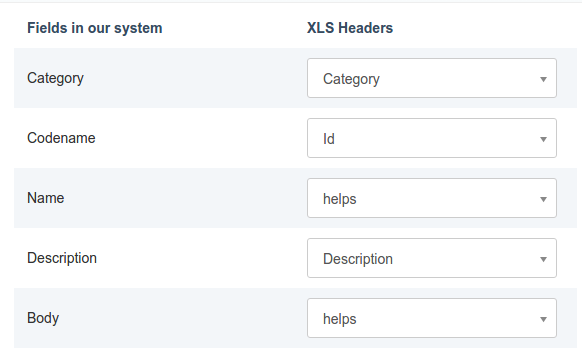
Different File Formats or Migration Help
If your content is in a format other than XLS/CSV (for example HTML, JSON, or a proprietary format), please reach out to the Helpjuice Import Team at kenan@helpjuice.com and the team will advise on the next steps.
Best Practices
- Always keep a backup of your current content before importing
- Validate your CSV/XLS file locally (header match, encoding, no extra blank rows)
- If copying content between languages, check destination language content first to see what already exists
- Run a test import with just a few articles to confirm the format is correct