Contact Us

If you still have questions or prefer to get help directly from an agent, please submit a request.
We’ll get back to you as soon as possible.

Please fill out the contact form below and we will reply as soon as possible.

  • Contact Us
  • Home

How to Get Your API Key

Obtain your Helpjuice API key to integrate and authenticate API requests

Written by Emil Hajric

Updated at September 24th, 2025

Contact Us

If you still have questions or prefer to get help directly from an agent, please submit a request.
We’ll get back to you as soon as possible.

Please fill out the contact form below and we will reply as soon as possible.

  • Customization
    Customization Guides
  • Article Editor
  • Getting Started
    Managing Users Analytics Content Management Permissions & Accessibility Video Tutorials
  • Integrations
  • API & Webhooks
    API V2 API V3
  • Languages & Translations
  • Authentication
  • Swifty AI
  • Settings
    User Settings User Behavior Knowledge Base Settings Custom Domain
+ More

To interact with Helpjuice's API v3, you'll need a unique API key. This key authenticates your requests and grants access to your account's data. Follow the steps below to retrieve your API key.

In this article, you’ll learn:

  • How to access your API credentials page
  • Steps to generate and copy your API key
  • Important considerations for API key security
  • Best practices for managing your API key

Accessing Your API Credentials

  1. Navigate to your Helpjuice account and log in with your credentials.
  2. Click on your profile icon in the bottom-left corner and select Settings.
  3. In the settings menu, click on API Credentials
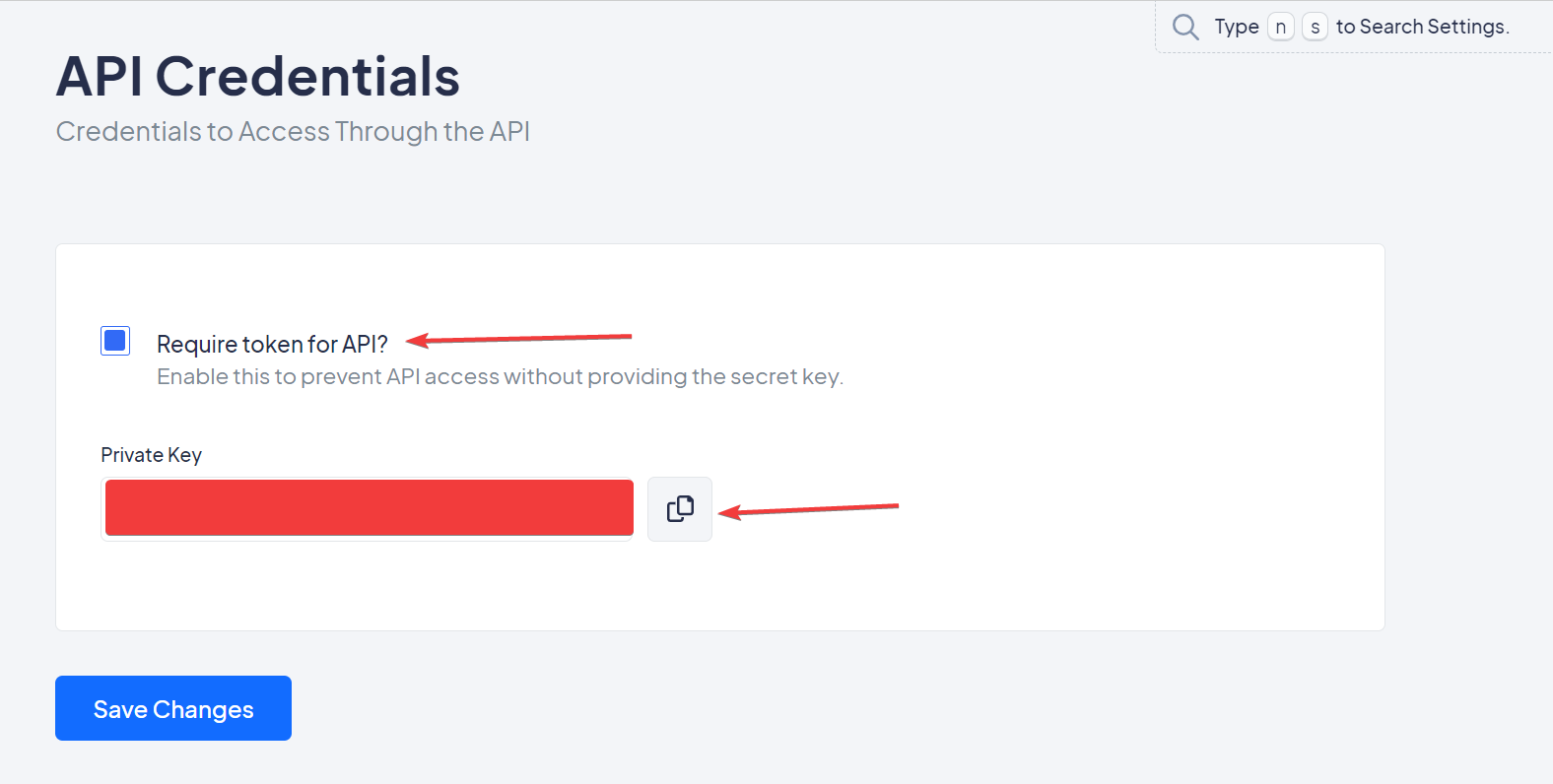
  4. Check the box labeled Require token for API?.
  5. Your Private Key will be displayed. Click Copy to save it to your clipboard.
  6. Save Changes

Only Super Administrators and Account Owners have access to the API Credentials settings page.


Important Considerations

  • Security: Keep your API key confidential. Do not share it or expose it in client-side code.
  • Permissions: The API key grants Super Administrator privileges to anyone with access to it.
  • Access: Each account has its own unique API key.

Best Practices

  • Environment Variables: Store your API key in environment variables to keep it secure.
  • Access Control: Limit access to your API key to trusted individuals and systems.
  • Regular Audits: Periodically review and regenerate your API keys to enhance security.


Was this article helpful?

Yes
No
Give feedback about this article

Related Articles

  • Content Preview
  • How to Export Your Helpjuice Data and Articles
  • How To Archive And Unarchive Content
  • Allowed IPs
  • How To Create User Groups
One Knowledge Base To Replace Them All
24/5 support
Constant Product Updates & Improvements
100% money back guarantee
99.9% Uptime
Features
  • AI Knowledge Base AI-Enabled
  • Helpjuice Extension AI-Enabled
  • Powered Editor AI-Enabled
  • Advanced Analytics AI-Enabled
  • Customizable Themes AI-Enabled
  • Swifty · Helpbar & Chatbot AI-Enabled
  • Multi-Language Support
  • Step-by-Step Tutorial Creator
  • Seamless Integrations
  • User Access Control
  • See All Features >>
Product
  • Product Roadmap
  • Pricing
  • Book a Demo
  • Policies & Security
  • Our Customers
  • About Helpjuice
  • Contact Our Team
Resources
  • Our Knowledge Base
  • Webinars
  • Success Stories
  • API Documentation
  • Data Import Guide
  • Helpjuice Blog
Copyright © 2025, Helpjuice Inc.
Helpjuice, Inc. is a registered US Corporation.
EIN 46-2257741 | Download W9
Made in America High Performer Ease of Use Get Support
Get Started For Free
4.8 average review on
Life’s too short to use mediocre software.
+1 (833) 387 3877
Powered by Helpjuice Helpjuice Swifty AI External Link
Expand