Contact Us

If you still have questions or prefer to get help directly from an agent, please submit a request.
We’ll get back to you as soon as possible.

Please fill out the contact form below and we will reply as soon as possible.

  • Contact Us
  • Home

How To Track User Activity

Learn how to monitor and track user activities in Helpjuice

Written by Amanda Stançani

Updated at September 22nd, 2025

Contact Us

If you still have questions or prefer to get help directly from an agent, please submit a request.
We’ll get back to you as soon as possible.

Please fill out the contact form below and we will reply as soon as possible.

  • Customization
    Customization Guides
  • Article Editor
  • Getting Started
    Managing Users Analytics Content Management Permissions & Accessibility Video Tutorials
  • Integrations
  • API & Webhooks
    API V2 API V3
  • Languages & Translations
  • Authentication
  • Swifty AI
  • Settings
    User Settings User Behavior Knowledge Base Settings Custom Domain
+ More

Monitoring user activities within your Helpjuice Knowledge Base is essential for maintaining content integrity, ensuring accountability, and optimizing user engagement. This guide provides step-by-step instructions on how to track and analyze user activities effectively.

In this article, you'll learn:

  • How to access the Activities section
  • How to filter activity results by user
  • How to export activity data
  • What actions are tracked in the Activities section
  • Best practices for utilizing activity logs

Accessing the Activities Section

  1. Log into your Helpjuice account.
  2. Navigate to your Dashboard.
  3. Click on the Activities icon.

Filtering Activity Results by User

To view activities performed by a specific user:

  • In the Activities section, locate the filter options.
  • Select the User filter.
  • Choose the desired user from the dropdown list.

This will display all activities performed by the selected user.

Exporting Activity Data

In the Activities section, click on the Export: XLSX button located at the top-right corner of the page.
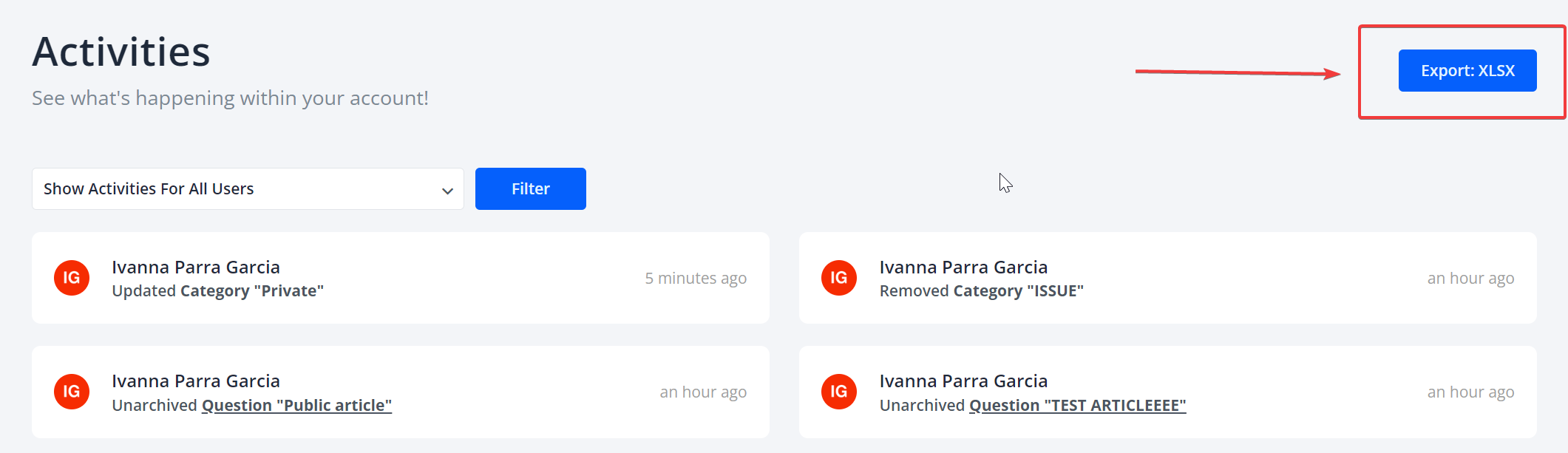
This will generate an Excel file containing all activity logs, which you can download and analyze offline.

Tracked Actions in the Activities Section

Helpjuice logs a variety of actions to provide a comprehensive history of user activities:

  • Added: Articles, categories, uploads, users, keywords, or files to an article.
  • Updated: Articles, categories, or users.
  • Published: Articles.
  • Reordered: Articles or categories.
  • Read: Articles or categories.
  • Opened: Articles or categories.
  • Removed: Articles, categories, uploads, or users.
  • User Signed In: Logs when a user signs into the system.

Best Practices

  • Regular Monitoring: Regularly check the Activities section to stay informed about user actions and content changes.
  • Assign Roles Appropriately: Ensure that users have appropriate roles and permissions to perform the desired actions.
  • Audit for Compliance: Use activity logs to audit user actions for compliance with internal policies and external regulations.


Was this article helpful?

Yes
No
Give feedback about this article

Related Articles

  • Content Preview
  • How to Export Your Helpjuice Data and Articles
  • How To Archive And Unarchive Content
  • Allowed IPs
  • How To Create User Groups
One Knowledge Base To Replace Them All
24/5 support
Constant Product Updates & Improvements
100% money back guarantee
99.9% Uptime
Features
  • AI Knowledge Base AI-Enabled
  • Helpjuice Extension AI-Enabled
  • Powered Editor AI-Enabled
  • Advanced Analytics AI-Enabled
  • Customizable Themes AI-Enabled
  • Swifty · Helpbar & Chatbot AI-Enabled
  • Multi-Language Support
  • Step-by-Step Tutorial Creator
  • Seamless Integrations
  • User Access Control
  • See All Features >>
Product
  • Product Roadmap
  • Pricing
  • Book a Demo
  • Policies & Security
  • Our Customers
  • About Helpjuice
  • Contact Our Team
Resources
  • Our Knowledge Base
  • Webinars
  • Success Stories
  • API Documentation
  • Data Import Guide
  • Helpjuice Blog
Copyright © 2025, Helpjuice Inc.
Helpjuice, Inc. is a registered US Corporation.
EIN 46-2257741 | Download W9
Made in America High Performer Ease of Use Get Support
Get Started For Free
4.8 average review on
Life’s too short to use mediocre software.
+1 (833) 387 3877
Powered by Helpjuice Helpjuice Swifty AI External Link
Expand