How Article Commenting Works
Collaborate and improve articles through inline commenting

Written by Amanda Stançani
Updated at September 23rd, 2025
Article commenting in Helpjuice allows you to leave comments on specific portions of an article’s content to give feedback, suggest changes, and collaborate more effectively. It improves content quality by making it easy for authors, reviewers, and collaborators to communicate directly in context.
In this article, you’ll learn:
- How to add a comment on article content
- How email notifications work for comments and replies
- How to resolve comments once addressed
- How to view resolved comments
- Best practices for using Article Commenting
How to Add a Comment
- Open the article you want to comment on in the editor.
- Select the text (a sentence, phrase, or block) where you want to leave feedback.
- Click the comment icon that appears.
- Write your comment in the pop-up.
- Post the comment.
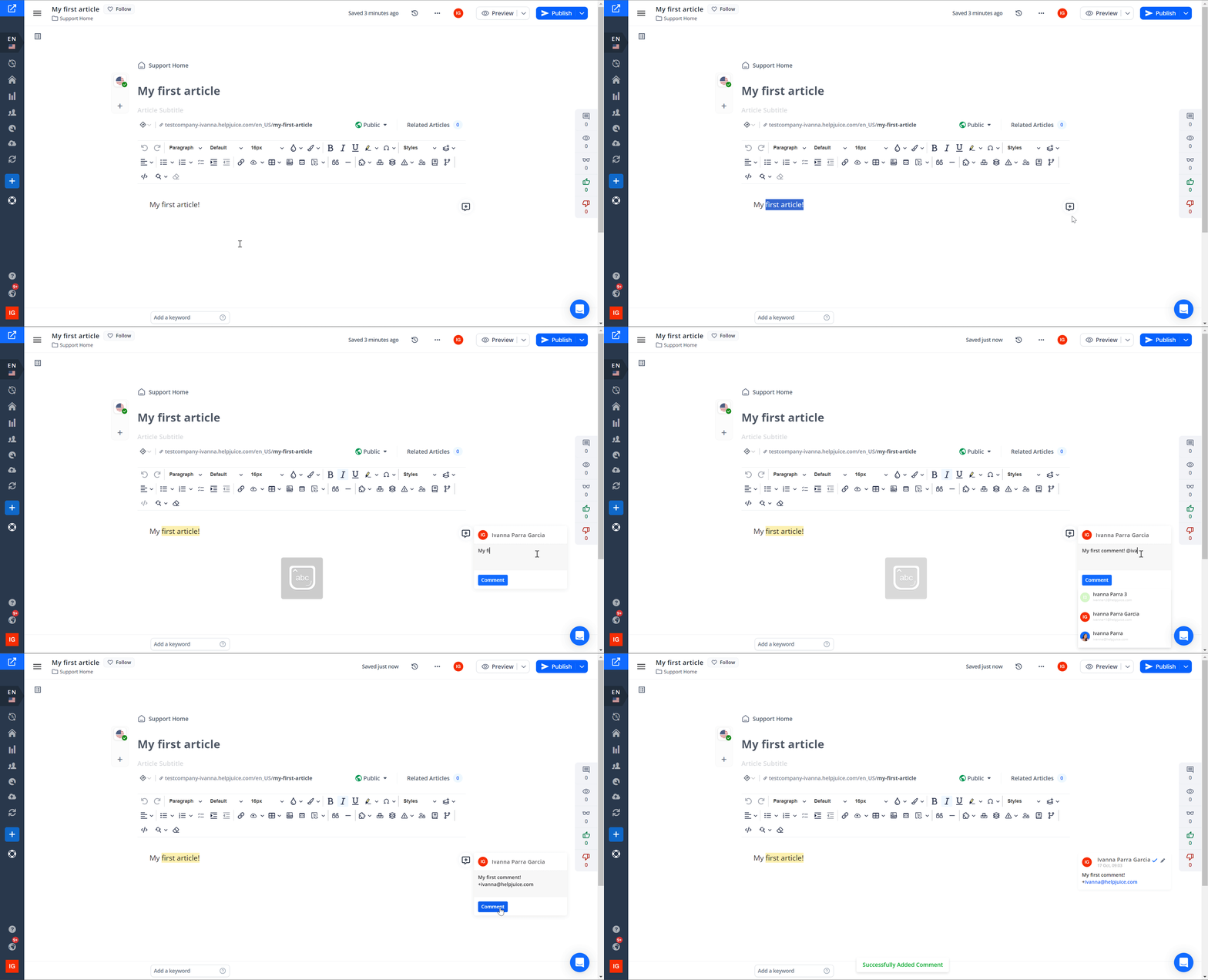
Use “@“ followed by a user’s name if you want to include someone specific in the discussion. They’ll receive an email notification.
Comment Notifications & Replies
- When you post a comment, the author of the article receive an email notification.
- If you use “@username” in your comment, that person will also be notified by email.
- Replies sent via those notification emails are also captured and added back into the comment thread inside Helpjuice.
- You can also check Comments in the Activities History

Resolving Comments
- Once a comment or feedback item has been addressed, you or someone in the editorial workflow can click “Resolve” next to the comment. This marks that comment as completed/handled.
- Resolved comments no longer appear in the active comment view but are still accessible in the Activities History.
Best Practices
- Comment on specific sections rather than entire articles. That helps reviewers understand exactly what needs attention.
- Use clear, constructive feedback – identify what could be improved (clarity, grammar, structure), not just “this is wrong”.
- @-mention people when you need their input. That helps keep everyone informed.
- Keep track of resolved comments to ensure nothing gets forgotten.
- Review comment threads before finalizing or publishing an article to make sure all feedback has been addressed.
By using Article Commenting effectively, your team can collaborate more closely and deliver articles that are clearer, more accurate, and better aligned with your organization’s standards.